Gemini Tasks Are Free in 6 Countries: How to Hand a Task to Gemini
Gemini now does tasks for free in the US, Japan, Korea, Canada, Australia and India: calls, shopping, bills. How to turn on Task mode and text Gemini.
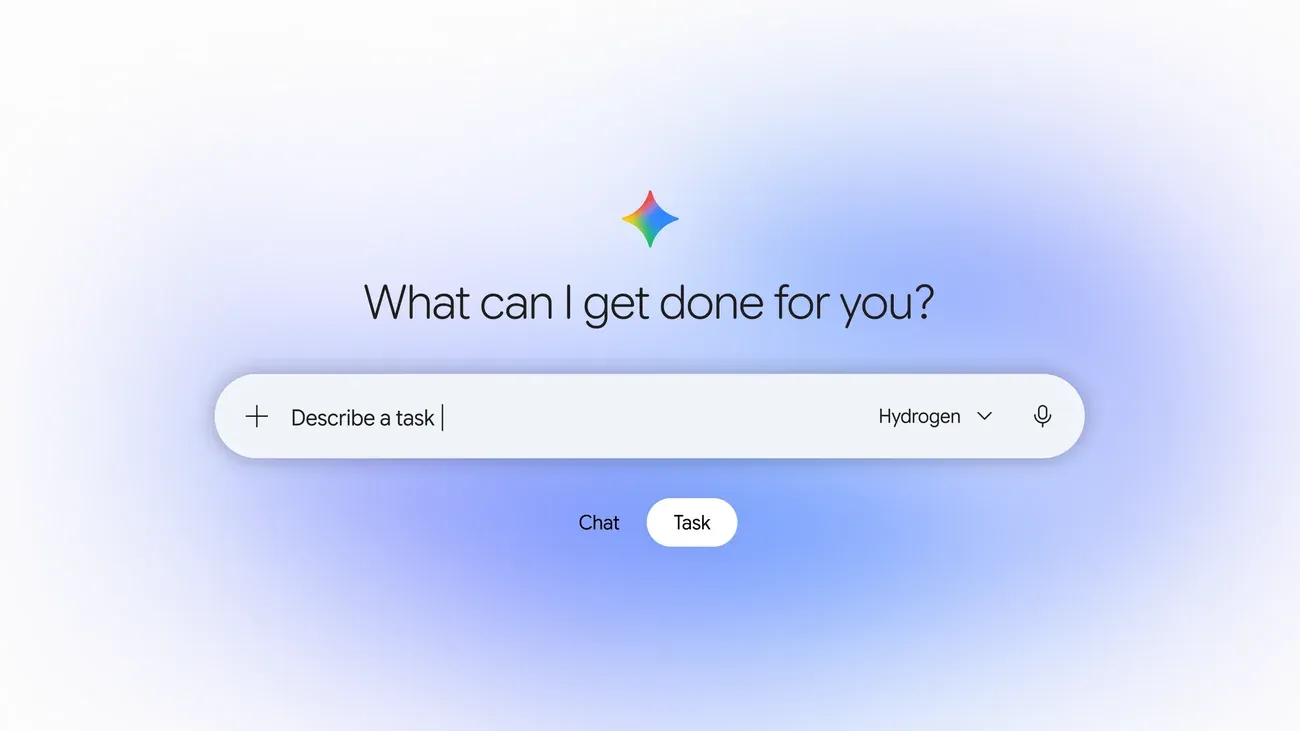 Image: Google
Google is rolling out tasks in the Gemini app for free to "hundreds of millions" of people in the US, Japan, Korea, Canada, Australia and India, powered by its new Gemini 4 Hydrogen model. Instead of only chatting, Gemini can now carry out jobs for you: phone businesses, shop and check out, go through bills and add events to your calendar. To start, open Gemini and flip the home-screen toggle from Chat to Task. A set of more advanced features is starting in the US first.
How to use Gemini Tasks
- Open the Gemini app.
- On the home screen, switch the toggle from Chat to Task.
- Tell Gemini what you need done, in plain words.
You can add instructions while it works, and Gemini is designed to stop and ask before important steps, such as pressing "Buy".
How to text or email Gemini (US first)
Starting in the US, you can also hand off tasks without opening the app:
- By email: forward an email to gemini@google.com.
- By text message: open Gemini on Android or iOS, tap Settings, then Channels, tap Set up under Text with Gemini, and verify your phone number. Texting uses RCS.
What Gemini can do as a task
Google's post gives these examples:
- Make phone calls: Gemini can call several businesses at once, such as two car dealerships, wait on hold, book the slot that fits and add it to Google Calendar. It tells the business straight away that it's an AI, businesses can opt out, and it won't share your payment or account details unless you say so.
- Go through bills: with your permission, it can log into a utility portal through Google Password Manager and analyse past statements in your email, for example to find what's driving up an electricity bill.
- Shop and pay: it compares products using Google's Shopping Graph, asks follow-up questions, can find discount codes and checks out with Google Pay. You can set a hard spending cap, and you keep your card's points, cashback and purchase protections. Receipts and tracking go to Google Wallet, which is also expanding to iOS.
- Groceries and apps: it connects with more than 60 apps, such as adding items to an Instacart order, including from a photo.
- School and family schedules: forward a batch of emails and it puts every date in your calendar, flags conflicts and can suggest texting another parent.
Is it safe?
Google says each task runs in a hardware-isolated virtual machine dedicated to your account, with filters against prompt injection and Google Safe Browsing limiting which links Gemini opens. Purchases use the Agent Payments Protocol (AP2) with digital card tokens from Mastercard and Visa, with American Express coming soon. For routine actions you trust, you can choose Always allow so Gemini stops asking each time, and you can disconnect apps or delete your history at any time.
Google also admits tasks can still fail: on some websites Gemini gets most of the way and then hands the screen back to you for the last click. If a task goes wrong, give the response a thumbs down.
Is Gemini Tasks free?
Yes, in the six launch countries. Google hasn't announced other countries yet, and the extra features (texting and email forwarding among them) start in the US. For more of Google's recent AI features, see how Ask Maps works in Europe.
Source: Google